• Skip to main content

AR Mavericks

Augmenting the reality of your life…

  • Home
  • Products
    • Tagisphere Portal
    • Tagisphere Projects
    • Tagis Tools =>
      • Tagis Mobile
      • Tagis CAD
      • Tagis Mapper
      • Tagis Surveyor
      • Tagis Web Map
  • Resources
  • Company
    • Contact
    • Legal Info
  • Login / Signup

Tagis Surveyor

Tagis Surveyor

Augmented Reality Tools for Surveyors

Tagis Surveyor Portal Publishing Tool

Tagis Surveyor projects provide tools specifically designed to support surveyors’ workflows. Upload CSV files to instantly create tens, hundreds, or even thousands of tags. Tagis Surveyor projects also offer access to NGS benchmark data as AR tags displayed in real-world locations.

Upload CSV Files to Create AR Geotags

Surveyors are typically familiar with *.csv files—a common format for organizing survey points, feature codes, points of interest (POIs), and more.. The Tagis Surveyor project tools let you map your point data from a *.csv file into the Tagisphere. The point data can be in any world-based geolocated coordinate system.
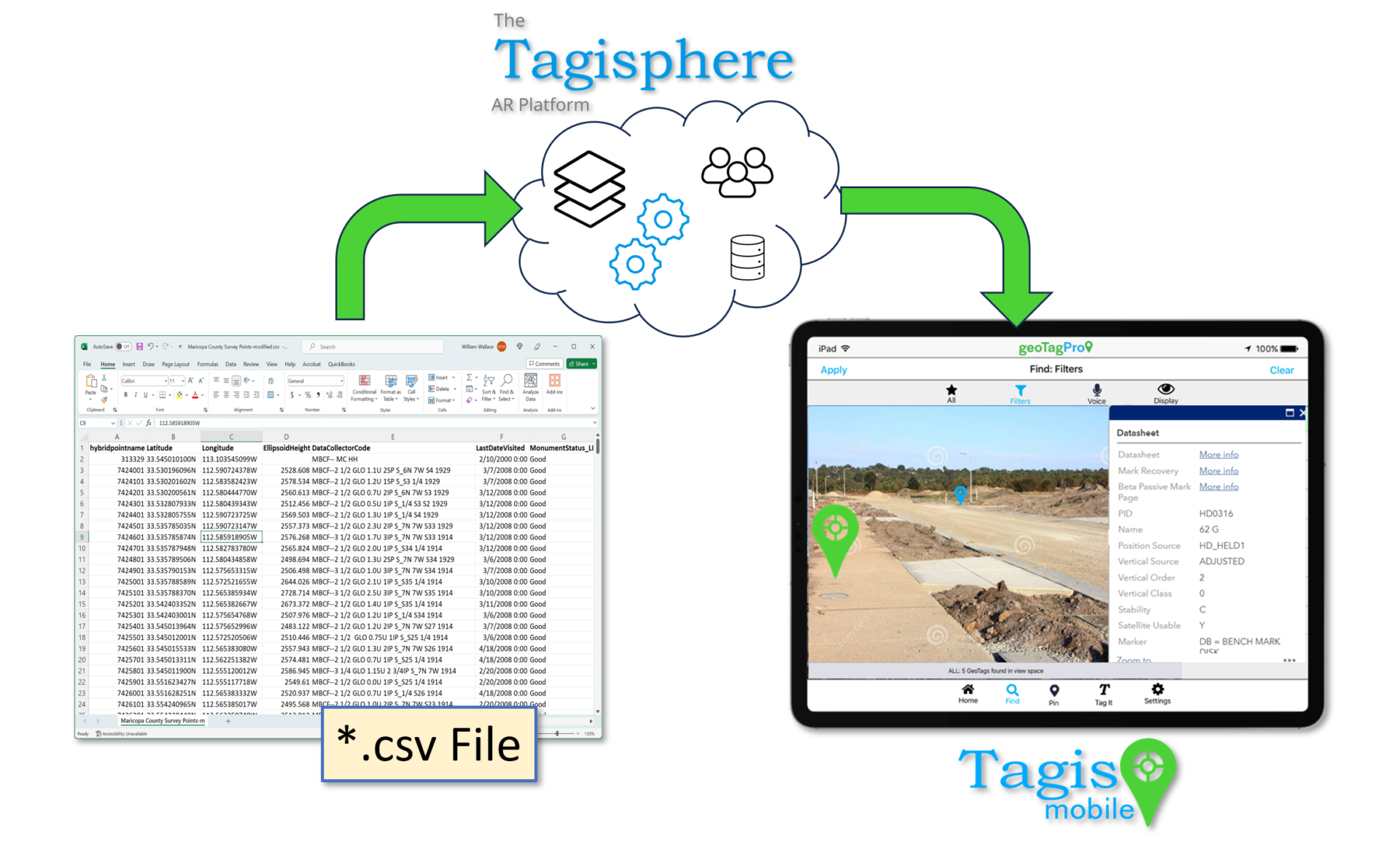
CSV-Diagram

Leverage Your Collected Point Data:
Easily Upload Familiar *.csv Files

Map Point Attributes into the Tagisphere Schema

Instantly Create Thousands of AR Tags

       Upload CSV File

Mobile Users can Access NGS Benchmark Data in AR

All Tagis Mobile users can access a public NGS project containing hyperlinked AR tags for nearby benchmarks. Instead of searching on a map, users can simply look around with their mobile device to view local benchmarks as AR geotag map pins. They can then access detailed data sheets for each benchmark directly through the app

This free service is available to all Tagis Mobile users for convenient access to NGS benchmark data.

NGS Benchmarks in AR:
Find Local Benchmarks Visually

Create Projects with your Own Control Network

Free Public Access to NGS Benchmarks
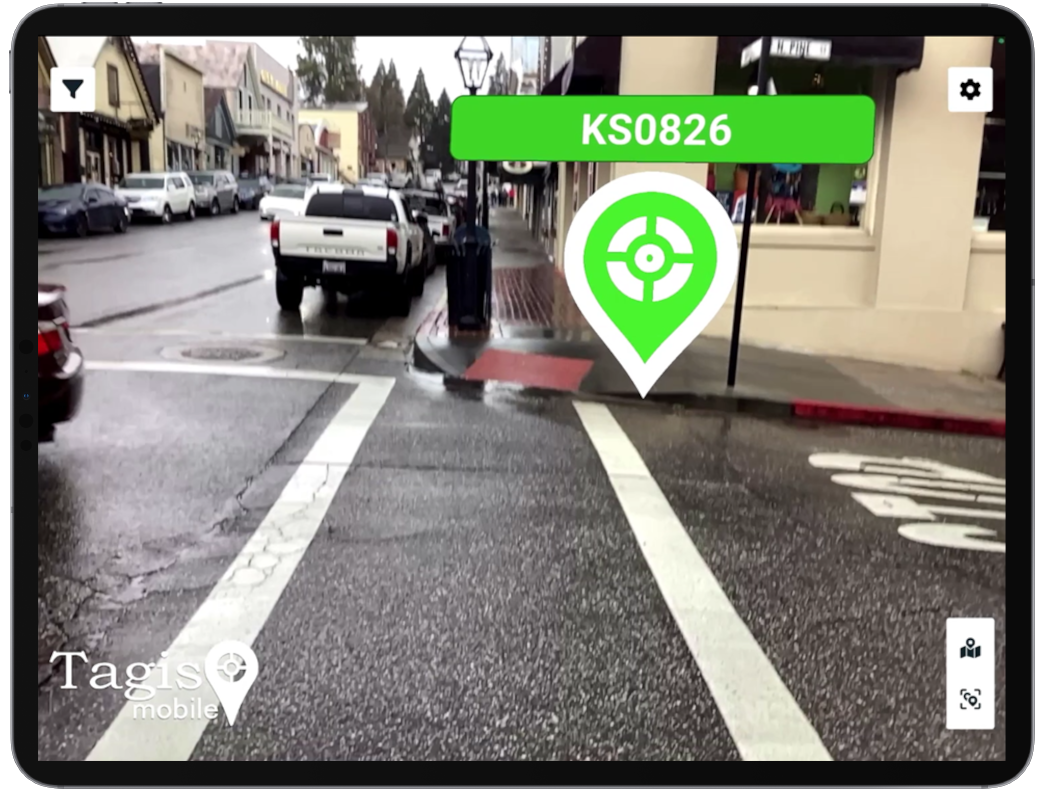
NGS Benchmark Video

NGS-in-Ipad

Feature Details:

UPLOAD: *.csv Format
The system currently supports uploading *.csv formats (other formats pending). Column headers are optional, and users can select the preferred delimiter. There are only a few required fields Label and Location X and Y. All other fields are optional.
  • Label*
  • Latitude* (x)
  • Longitude* (y)
  • Link
  • Description
  • Category
  • Subcategory
  • EPSG
*Required fields
UPLOAD: Schema Mapping
When uploading a *.csv file, users can map columns directly to the Tagisphere data schema. There are only a few required fields (see Upload: *.csv Format for a full description)

UPLOAD: Coordinate Systems
The point data in the *.csv may be in any world coordinate system supported by the EPSG system https://epsg.io/. Data may also be formatted in Lat/Long coordinates according to WGS84.

TAGS: Qty. of Tags
The Tagisphere AR Portal can accommodate a high volume of tags; however, it is recommended to limit each project to fewer than 100,000 tags for optimal performance. Depending on the subscription level, there may be restrictions on the total number of tags available within a project.

  • Your subscription level such as a Free subscription will only support 50 and one project, whereas a basic subscription will support 100 tag for its single project.
  • For subscriptions supporting tens of thousands of tags, it is advisable to limit each project to 100,000 tags. To manage larger quantities, consider overlaying multiple projects within the same spatial area.
TAGS: Stored in Tagisphere
The upload process extracts tag data from the *.csv file and maps it to the Tagisphere data schema. This mapped data is stored in the Tagisphere storage location as per your setup. Most subscription (SaaS) users will have their data stored in the Tagisphere online cloud storage (The Tagisphere). For users running a dedicated Tagisphere AR Portal server, data is stored on their proprietary server.

TAGS: Manage/Edit
Tags that have been uploaded using the CSV process become standard tags in the Tagisphere AR Portal. Therefore, they can be edited, and deleted just as any other stored tag created by any other means..

NGS: User Access
These NGS banchmark AR tags are available via a public project that all users may access when using the Tagis Mobile app. This is a Free service provided by AR Mavericks, Inc. as a part of the Tagisphere AR Portal services.

NGS: Data Access
The NGS benchmarks contain online available data in the form of associated properties and hyperlinks to PDF data sheets for each benchmark. Just as any user can access this data from the NGS online map service, this same data is available from the NGS benchmarks displayed as AR geotags in the Tagis Mobile App.

  • Home
  • Products
  • Resources
  • Company
  • Login / Signup

Copyright © 2026 · AR Mavericks • Legal/Privacy • Contact